Friday, October 21, 2016

Automated Data Archive

Setting up a process to archive data in PeopleSoft requires two steps.  The first copies the data to your defined history table.  Oracle has forced you to run a second step where you choose the batch ID of your first step to delete the data from the source table.  It is well documented that you "Must have a secondary step to delete archived data from online tables".  The problem I was having is that our requirement was to have this to all happen on a schedule without manual intervention.  I used this solution to setup the entire process in a scheduled Jobset.

PIA Setup

Data Archive Manager

  PeopleTools  \ Data Archive Manager \  Homepage
  1. Create a Archive Record following Oracle Documentation and your Application Engine.
  2. Define an Archive Object identifying the Archiving table and the history record from step 1
  3. Create a Public Query to identify the rows you want archived
  4. Define your Archive Template using the Archive Object from step 2
    1. Add your Query for the Selective Archiving Query
    2. Add Archive Selection AE Process Post AE Program MCM_ARCH_BAT
  5. Create Run Controls
    1. My Archive example I name it MCM_ARCHIVE
      • Using your new Archive Template, Selection process type
      • Set the selective query to your query added in the template
    2. Create your delete run control with the same name adding "_DELETE" in my example it us named MCM_ARCHIVE_DELETE
      • Using your new Archive Template, Delete process type
      • Note:  You need to run the full MCM_ARCHIVE process and delete once manually in order to create a delete run control because Batch Number is a required field.

Jobs Setup

  PeopleTools \  Process Scheduler \  Jobs

Create a job and add 2 application process instances of PSARCHIVE.


 PeopleTools \ Process Scheduler \ Schedule JobSet Definitions

You can now add the Job you created to a existing Jobset or a new Jobset.

  1. Set the first instance to your ARCHIVE run control
  2. Set the second instance to the _DELETE run control
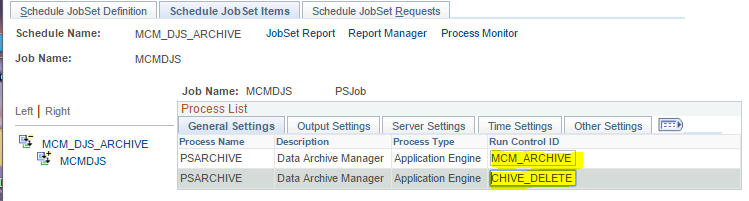


Running the Job

Now when this Jobset is run the job will first execute the PSARCHIVE step copying the selection criteria data to the history table.  Because of the Archive Template post AE task an App Engine will run updated your batch ID in the second Run Control to the same batch ID run in the first process.  The job then executes the second process to delete the batch from the archiving table.

Record and Application Engine Setup

  1. Create a Archive Record following Oracle Documentation 
  2. Create your Application Engine as defined below.  In my example it was named MCM_ARCH_BAT
Your Application Engine needs 2 actions. The first one is a standard SQL Init step that loads your state record. I used the delivered record ARCH_RPT_AET as a state record because it already contained the fields I needed.

%Select(ARCH_RPT_AET.OPRID,ARCH_RPT_AET.RUN_CNTL_ID,ARCH_RPT_AET.PSARCH_ID) 
 SELECT OPRID 
 , RUN_CNTL_ID 
 , PSARCH_ID 
  FROM PSARCHRUNCNTL 
 WHERE OPRID = %OperatorId 
   AND RUN_CNTL_ID = %RunControl

The Second is a PeopleCode Action to update the Delete version of the run Control.
/* Description:  The AppEngine will be used as in a Archive Template 
              to update a specific Delete Run Control
*/

Local number &batchNumber;
Local string &DeleteRunControl;
Local Record &Rec;

/* What process is currently running */
MessageBox(0, "", 0, 0, "AET:%1, %2, %3", 
           ARCH_RPT_AET.PROCESS_INSTANCE, ARCH_RPT_AET.RUN_CNTL_ID, ARCH_RPT_AET.PSARCH_ID);

/* What Batch ID was created for this Archive Process */
Local String &qry = "SELECT PSARCH_BATCHNUM FROM PSARCHBATCH WHERE PROCESS_INSTANCE = :1";
SQLExec(&qry, ARCH_RPT_AET.PROCESS_INSTANCE, &batchNumber);
MessageBox(0, "", 0, 0, "This Batch ID: %1", &batchNumber);

/* Check that the matching Delete Run Control exists */
&DeleteRunControl = ARCH_RPT_AET.RUN_CNTL_ID | "_DELETE";

&Rec = CreateRecord(Record.PSARCHRUNCNTL);
&Rec.OPRID.Value = ARCH_RPT_AET.OPRID;
&Rec.RUN_CNTL_ID.Value = &DeleteRunControl;
&Rec.PSARCH_ID.Value = ARCH_RPT_AET.PSARCH_ID;
If &Rec.SelectByKey() Then
   /* Delete Run Control Found */
   If &Rec.PSARCH_PROCESS.Value = "D" Then
      /* Set batch value */
      &Rec.PSARCH_BATCHNUM.Value = &batchNumber;
      If Not &Rec.Update() Then
         MessageBox(0, "", 0, 0, "Error updating %1", &DeleteRunControl);
      End-If;
   Else
      MessageBox(0, "", 0, 0, "Your matching run control is not setup as Delete");
   End-If;
Else
   MessageBox(0, "", 0, 0, "You do not have a matching run control for the DELETE step");
   MessageBox(0, "", 0, 0, "Missing Run Control %1, ARCHIVE ID %2 for user %3"
              , &DeleteRunControl, ARCH_RPT_AET.PSARCH_ID, ARCH_RPT_AET.OPRID);
End-If;

Monday, September 12, 2016

DELETE SQL performance

Delete Performance and ROWID 

We discovered slow performance on a DELETE statement that was using an EXISTS joining a related table and temporary table.  The problem is the entire subselect is executed returning a lot of  data to be evaluated only to delete a few rows from the source table.

To speed this up I added the original source table to the join and the driving table that gave me the smallest set of data.  In this case it was to join SAD_EXT_CRS_COM to EXT_COURSE followed by joining to the temporary table.  Now the the optimizer also help the subselect run extremely fast.  At this point we just need to convert the EXISTS to an IN statement and use the oracle pseudocolumn ROWID which is the fastest way to access a single row. The delete query now executes in no time.

Slow version using WHERE EXISTS

 DELETE FROM %Table(SAD_EXT_CRS_COM) c 
WHERE EXISTS ( SELECT NULL FROM %Table(EXT_COURSE) p 
                     , %Table(M_ET_PST_TMP) t 
               WHERE t.process_instance = %Bind(process_instance) 
                 AND t.oprid = %OperatorId 
                 AND p.emplid = t.emplid 
                 AND p.ext_org_id = t.ext_org_id 
                 AND p.ls_data_source = 'OET' 
                 AND p.ext_data_nbr = t.ext_data_nbr 
                 AND c.emplid = p.emplid 
                 AND c.ext_org_id = p.ext_org_id 
                 AND c.EXT_COURSE_NBR = p.EXT_COURSE_NBR ) 

Faster version using ROWID IN

DELETE FROM %Table(SAD_EXT_CRS_COM) c 
WHERE ROWID IN ( SELECT C.ROWID FROM %Table(SAD_EXT_CRS_COM) C 
                   JOIN %Table(EXT_COURSE) P ON C.EMPLID = P.EMPLID 
                    AND C.EXT_ORG_ID = P.EXT_ORG_ID 
                    AND C.EXT_COURSE_NBR = P.EXT_COURSE_NBR 
                   JOIN %Table(M_ET_PST_TMP) T ON P.EMPLID = T.EMPLID 
                    AND P.EXT_ORG_ID = T.EXT_ORG_ID 
                    AND P.EXT_DATA_NBR = T.EXT_DATA_NBR 
                   WHERE P.LS_DATA_SOURCE = 'OET' 
                     AND T.PROCESS_INSTANCE = %Bind(process_instance) 
                     AND T.OPRID = %OperatorId ) 

Friday, May 27, 2016

Peoplesoft Menu Listing or Search

SQL for Menu Searching

Here is a very handy way to either export a full listing of the PeopleSoft Menu or search for a specific menu item.
----  Menu Look-up
SELECT SRCH.PORTAL_LABEL LABEL
   , NVL(SRCH.PORTAL_URI_SEG2, ' ') COMPNOENT
   , SRCH.PORTAL_OBJNAME
  --L1.PORTAL_LABEL,  L2.PORTAL_LABEL,  L3.PORTAL_LABEL,  
  --L4.PORTAL_LABEL,  L5.PORTAL_LABEL,  L6.PORTAL_LABEL
  ,'Main Menu > ' || L1.PORTAL_LABEL || decode(L1.PORTAL_REFTYPE, 'F', ' > ')
  || L2.PORTAL_LABEL  || DECODE(L2.PORTAL_REFTYPE, 'F', ' > ')
  || L3.PORTAL_LABEL  || DECODE(L3.PORTAL_REFTYPE, 'F', ' > ')
  || L4.PORTAL_LABEL  || DECODE(L4.PORTAL_REFTYPE, 'F', ' > ')
  || L5.PORTAL_LABEL  || DECODE(L5.PORTAL_REFTYPE, 'F', ' > ')
  || L6.PORTAL_LABEL NAV_PATH,
  decode(SRCH.PORTAL_REFTYPE, 'F', ' ', 'C', SRCH.DESCR254) DESCR
FROM PSPRSMDEFN L1
  LEFT JOIN PSPRSMDEFN L2
  ON L2.PORTAL_NAME         =L1.PORTAL_NAME
  AND L2.PORTAL_PRNTOBJNAME = L1.PORTAL_OBJNAME
  LEFT JOIN PSPRSMDEFN L3
  ON L3.PORTAL_NAME         =L2.PORTAL_NAME
  AND L3.PORTAL_PRNTOBJNAME = L2.PORTAL_OBJNAME
  LEFT JOIN PSPRSMDEFN L4
  ON L4.PORTAL_NAME         =L3.PORTAL_NAME
  AND L4.PORTAL_PRNTOBJNAME = L3.PORTAL_OBJNAME
  LEFT JOIN PSPRSMDEFN L5
  ON L5.PORTAL_NAME         =L4.PORTAL_NAME
  AND L5.PORTAL_PRNTOBJNAME = L4.PORTAL_OBJNAME
  LEFT JOIN PSPRSMDEFN L6
  ON L6.PORTAL_NAME         =L5.PORTAL_NAME
  AND L6.PORTAL_PRNTOBJNAME = L5.PORTAL_OBJNAME
  LEFT JOIN PSPRSMDEFN SRCH
  ON SRCH.PORTAL_NAME       = 'EMPLOYEE'
  AND SRCH.PORTAL_OBJNAME   
    = NVL(L6.PORTAL_OBJNAME,NVL(L5.PORTAL_OBJNAME,NVL(L4.PORTAL_OBJNAME, 
           NVL(L3.PORTAL_OBJNAME,(NVL(L2.PORTAL_OBJNAME,NVL(L1.PORTAL_OBJNAME,' ')))))))
WHERE L1.PORTAL_NAME ='EMPLOYEE' AND L1.PORTAL_PRNTOBJNAME = 'PORTAL_ROOT_OBJECT'
--*************************************************************************************--
--  Search for Items
--*************************************************************************************--
  --AND SRCH.PORTAL_URI_SEG2    = 'MCM_ADV_SUMMARY'     -- Component
  --AND SRCH.PORTAL_LABEL       LIKE 'PeopleTools%'     -- Label
  --AND L1.PORTAL_OBJNAME       = 'PT_PEOPLETOOLS'      -- Folder/Ref Object Name
ORDER BY L1.PORTAL_REFTYPE DESC,  L1.PORTAL_LABEL,
  L2.PORTAL_REFTYPE DESC,  L2.PORTAL_LABEL,  L3.PORTAL_REFTYPE DESC,  L3.PORTAL_LABEL,
  L4.PORTAL_REFTYPE DESC,  L4.PORTAL_LABEL,  L5.PORTAL_REFTYPE DESC,  L5.PORTAL_LABEL,
  L6.PORTAL_REFTYPE DESC,  L6.PORTAL_LABEL ;

Tuesday, December 8, 2015

Component Verification SQL

Component Verification

This query was built as part of a script to review projects.  The objective was a quick way to confirm all the components in your project are following the company standards. Peoplesoft will often use a Binary bit mapping to turn several flags into a single decimal value.  In this case the column SHOWTBAR is a numeric SUM of 6 binary values 111111 = 1+2+4+8+16+32 = 63.  If you experiment with these you will notice some odd behavior like the Disable Toolbar when checked doesn't add 1 to the decimal but Disable Pagebar when checked adds the value 2.

Columns
  1. What is the default Search setting for the component
  2. What flags are set for "Multi Page Navigation"
  3. Disable Toolbar Flag
  4. Disable Pagebar Flag
  5. Disable Help URL
  6. Disable Copy URL
  7. Disable New Window
  8. Disable Customize Page
Binary Mapping for SHOWTBAR
  • +1 Disable Toolbar is Unchecked
  • +2 Disable Pagebar is Checked
  • +4 Help Link is Uncheked
  • +8 Copy URL Link is Unchecked
  • +16 New Window Link is Unchecked
  • +32 Customize Page Link is Unchecked


select PNLGRPNAME as Component,
CASE DFLTSRCHTYPE WHEN 0 THEN 'BASIC SEARCH *ERROR*' 
                  WHEN 1 THEN 'ADVANCED SEARCH' 
                  ELSE to_char(DFLTSRCHTYPE) END as SEARCH_TYPE,
CASE PNLNAVFLAGS  WHEN 0 THEN 'MULTI-PAGE NAV OFF' 
                  WHEN 1 THEN 'FOLDERS (TOP)' 
                  WHEN 2 THEN 'HYPERLINKS (BOTTOM)' 
                  WHEN 3 THEN 'FOLDER + LINKS NAV ON' 
                  ELSE TO_CHAR(PNLNAVFLAGS) END AS NAVIGATION_TYPE
,DECODE(BITAND(PSPNLGRPDEFN.SHOWTBAR,1),1,'N','Y') AS DISABLE_TOOLBAR
,DECODE(BITAND(PSPNLGRPDEFN.SHOWTBAR,2),2,'Y','N') AS DISABLE_PAGEBAR
,DECODE(BITAND(PSPNLGRPDEFN.SHOWTBAR,4),4,'N','Y') AS SHOW_HELP_URL
,DECODE(BITAND(PSPNLGRPDEFN.SHOWTBAR,8),8,'N','Y') AS SHOW_COPY_URL
,DECODE(BITAND(PSPNLGRPDEFN.SHOWTBAR,16),16,'N','Y') AS SHOW_NEW_WIN
,DECODE(BITAND(PSPNLGRPDEFN.SHOWTBAR,32),32,'N','Y') AS SHOW_CUSTOMIZE_PAGE
FROM PSPNLGRPDEFN WHERE PNLGRPNAME IN (SELECT PI.OBJECTVALUE1 FROM PSPROJECTITEM PI WHERE PI.PROJECTNAME = 'MY_PROD_NAME' AND PI.OBJECTTYPE=7);

Wednesday, August 26, 2015

String to Boolean


I needed a way to convert a string to a boolean. Specifically, I wanted to use a message in the message catalog to store a variable to allow us to easily change the flow in a specific page. This turned out to be much easier than I expected.

Using the following short hand returns a true if the string matches or false if it does not.

(&theString = "Y")

Here is how I used it with the message catalog text:
Local array of number &openMonths = CreateArray(1, 5, 9);
Local boolean &openSeason = (MsgGetText(21027, 8, "false") = "true");
...
If (&openMonths.Find(Month(&today)) > 0 And
      Day(&today) < 16) Or
      &openSeason Then
       ...
end-if;
     

Tuesday, April 28, 2015

Peoplesoft Styles Demo

View Peoplecode Styles

SQL


Run this SQL against your database and copy the output.
SELECT '<div class="' || STYLECLASSNAME || '">' || STYLECLASSNAME || '</div>'
FROM PSSTYLECLASS WHERE STYLESHEETNAME = 'PTSTYLEDEF'

Page

Temporary add an HTML area to any page and paste your SQL output into the value constant of your HTML area. View your page and you'll see a demo of every style for that Style sheet name in the query you ran.

Extra

If you want to create a more permanent page in your development environment that dynamically loads the HTML area with any style sheet you choose from the system you can do the following:

 Record

Create a new derived record (MY_RECORD) and add the fields
  • STYLESHEETNAME  (prompt table edit : EOPP_STSHEET_VW)
  • HTMLAREA

Page

Create a new page and add your both your derived record fields to it.  

Component

Create a component add your new page to it and add the following Peoplecode to the STYLESHEETNAME FieldChange event.

Local string &qry, &qoutput, &html;
Local SQL &sql;
Local array &AAny = CreateArrayAny();

&qry = "SELECT '<div class=' || STYLECLASSNAME || '>' || STYLECLASSNAME || '</div>'";
&qry = &qry | " FROM PSSTYLECLASS WHERE STYLESHEETNAME = :1 order by STYLECLASSNAME ";

&html = "";

&sql = CreateSQL(&qry, MY_RECORD.STYLESHEETNAME);
While &sql.Fetch(&AAny)
   &html = &html | &AAny [1];
End-While;

MY_RECORD.HTMLAREA.Value = &html;

Register your component to the menu and load your new page.

Thursday, April 23, 2015

PeopleCode Reference Links

Reference Links

Google is one of a programmers best friends and after a while you build up a small collection of great resources.  Here are a couple of my favorite places to find People code solutions and examples:

PeopleCode Language Reference 8.53

  • Built-in Functions
  • Meta-SQL
  • System Variables
  • Meta-HTML

PeopleCode API Reference 8.53

Every class in a great Tree view that includes a quick link to the class details such as:
  • Understanding
  • Using
  • Declaring
  • Built-in Functions
  • Methods
  • Properties
  • etc....

PeopleCode Developers Guild 8.43


  • Operators
  • Data Types
  • Expressions
  • Variables
  • Editors
  • Events
  • Debugging
  • Short Cuts

PeopleCode Built-in Functions 8.50

Listing of every built in function in one place sorted by category.  
With Frames version.

Toolbox.com 

Message board with many users who post solutions.and is most often referenced when doing a Peoplecode google search.


I have a few other links in my links and references page.

Wednesday, April 22, 2015

Custom PeopleSoft Exceptions

Application Package

I created an application package with a couple classes but I soon realized I needed different exceptions for different behaviours.  This is easy in JAVA you just build a custom exception that extends the exception class.  I figured there must be similar way to do this in poeplesoft but couldn't find an example in peoplebooks they seem to always just use the "CreateException" method.  This example will give you the ability to throw and catch different custom exceptions.


Application Package

MY_PERSON_SYNC
  • MY_PersonBuilder
  • MY_PersonSync
  • MYPersonException

Exception Class

This first step is create your Exception.  I put mine as a different class in the same package that will be throwing it.  This class will extend exception and only have the basic constructor method in it.  This constructor will create the super class Exception using the common peoplesoft method CreateException.  I accepted only the message as a string but you could accept your own custom message numbers as well if you like.


class MYPersonException extends Exception
   method MYPersonException(&MSG As string);
end-class;

method MYPersonException
   /+ &MSG as String +/
   %Super = CreateException(0, 0, &MSG);
end-method;

Person Builder Class
Next in my class MY_PersonBuilder I need I have 2 different errors.  The first is one that I will issue a standard exception that should really stop the process all together.  The second is for when the problem could only be related to a single individual and if multiple transactions are being processed only reject this one transaction.


import MY_PERSON_SYNC:MYPersonException;
...
/* If it is an SQL error you might throw standard Exception */
&recResult = &rec.Update();
If &recResult = false Then
    throw CreateException(0, 0, "update to table **NOT** successful for %1", &rec.ID.Value);
End-If;

/* If my error was specific to a single transaction I would throw my custom Exception */
throw create MY_PERSON_SYNC:MYPersonException("Person missing a Xref value. ");

Person Sync Class
The class MY_PersonSync actually implements the class PS_PT:Integration:INotificationHandler so it has a OnNotify method where the try catch will exist. This is the location that determines if an error should be thown stopping the entire process or just drop a single transaction and continue to process the remaining ones.

import MY_PERSON_SYNC:MYPersonException;
...
   try
      &personBuilder.AddPersonAudit();
      &psXrefId = &personBuilder.AddXrefPS();
      &newid = &personBuilder.GenerateNewID("", False);
      &EMSTXrefId = &personBuilder.AddXrefEMST();
      &alias = &personBuilder.AddIdAlias(&newid);
   catch MY_PERSON_SYNC:MYPersonException &exPerson
      MessageBox(0, "", 0, 0, &exPerson.ToString());
   catch Exception &exError
      Error &exError.ToString();
   end-try

Thursday, April 2, 2015

Using simple HTTP Connectors in Peoplecode

Often times information or remote methods need to be invoked through a very simple HTTP GET/POST request. My exact scenario was to issue an HTTP POST with a single value and the external server would issue a single response code (<response>000</response>) similar to xml but in plain txt. I only needed to issue this from peoplecode in real time and evaluate the response code for success or failure. After days of digging I finally came up on some Integration broker methods that made this task very simple. From this simple demo you should be able to expand your HTTP requests and responses to fit your needs.

External Server

I made a very simple PHP page to respond the same type of message the external system would issue plus dump all the get/post values just for testing.

//PHP Basic HTTP Response Code
$responseValue = "000";
$rawPostContent = file_get_contents("php://input");

// Loop through all URL GET parameters
foreach ($_GET as $name => $value) {
 if($name == "response")
  $responseValue = $value;
}  
  
echo "<response>$responseValue</response>";
echo "<http_method>".$_SERVER['REQUEST_METHOD']."</http_method>";
echo "<proxyMethod>$method</proxyMethod>";

echo "<info> <![CDATA[ ";
foreach ($_POST as $name => $value) {
 echo " POST $name: $value, ";
}  
foreach ($_GET as $name => $value) {
 echo " GET $name: $value,";
}  
echo "]]></info>\n";
echo " <rawhttp><![CDATA[ $rawPostContent ]]></rawhttp> ";

From your browser you simply use the URL http://localhost/webservice.php?response=999
and the response should look something like this:
<response>999</response>
<http_method>GET</http_method>
<info> <![CDATA[  GET response: 999,]]></info>
<rawhttp><![CDATA[  ]]></rawhttp>

If this page is called from a POST the RAWHTTP value will include the posted variables string.

Peoplesoft Node and Routing

When using the connectors you can either load them directly from the node or from a route.  In my example I've setup the node as a GET and the routing as a POST.

Here I  create a simple node and setup the HTTPTARGET connector.  The method here is GET and the The Primary URL is http://[ipaddress]/webservice.php?response=999.


Here I create an active route within a node with the method POST and the same primary URL as above.

The operation tied to the routing that is used to create the message is defined as Synchronous and with a basic message defined.  I was also able to use the same empty message (<?xml version="1.0"?> <MCM_STUPPD_MSG/>) for both request and response.


PeopleCode

HTTP GET

You'll notice I've added a GET query string into the URL and using code to show you that you can use either method or both. Both values show up in the response GET variable list. I also show you how you can loop through the properties. In my final solution I needed to add a unique path to the PRIMARYURL depending on the situation and to do this I would loop through and save the string for primary URL. I then deleting the existing and added the modified PRIMARYURL with the additional path required. Note: Adding a property does not overwrite the existing one if you add a second PRIMARYURL both will exist in the properties list and I'm not sure which would be used.
Local Message &msgRequest, &msgGetResponse;
Local any &ans;
Local string &ibPropName, &ibPropValue;

/* GET */
MessageBox(0, "", 0, 0, " Start %1", %Datetime);
MessageBox(0, "", 0, 0, "HTTP GET Request ");

/* Setup the request message object */
&msgRequest = CreateMessage(Operation.MCM_STUPPD_WS);
/* Setup the request using the Node */
&ans = &msgRequest.IBInfo.LoadConnectorPropFromNode("MCM_STUPPD_TST");
&ans = &msgRequest.IBInfo.IBConnectorInfo.AddQueryStringArg("USERID", "BILLYBOB");

/* Loop through all the property values for logging and debugging only */
For &i = 1 To &msgRequest.IBInfo.IBConnectorInfo.GetNumberOfConnectorProperties()
   &ibPropName = &msgRequest.IBInfo.IBConnectorInfo.GetConnectorPropertiesName(&i);
   &ibPropValue = &msgRequest.IBInfo.IBConnectorInfo.GetConnectorPropertiesValue(&i);
   MessageBox(0, "", 0, 0, "Property : %1 = %2", &ibPropName, &ibPropValue);
End-For;

/* Send HTTP Connector request */
&msgGetResponse = %IntBroker.ConnectorRequest(&msgRequest);
MessageBox(0, "", 0, 0, "HTTP RAW Response: %1 ", &msgGetResponse.GetContentString());

Output
Start 2015-04-02-12.10.58.000000 (0,0)

HTTP GET Request  (0,0)

Property : Accept = */* (0,0)

Property : sendUncompressed = Y (0,0)

Property : Method = GET (0,0)

Property : URL = http://localhost/webservice.php?response=999 (0,0)

HTTP RAW Response: <response>999</response>
<http_method>GET</http_method>
<info> <![CDATA[  GET response: 999,  GET USERID: BILLYBOB, ]]></info>
 <rawhttp><![CDATA[  ]]></rawhttp> 
  (0,0)

HTTP POST

The post is very similar to the GET except I'm loading this message IBinfo connector from the route where I setup the connector as a POST. I will also be adding an XML document to the message and it will be converted to a simple string for the final http connection if your XML document is defined as the following:
<?xml version='1.0'?>
   <data psnonxml='yes'>  
      <![CDATA[ variable1=EDDIE&variable2=BLAH ]]>  
   </data >
I use the built in Peoplesoft XMLDoc and XMLNode methods to do this.
Local Message &msgRequest, &msgPostResponse;
Local any &ans;
MessageBox(0, "", 0, 0, " Start %1", %Datetime);
MessageBox(0, "", 0, 0, "HTTP POST Request ");

/* Setup the request message object */
&msgRequest = CreateMessage(Operation.MCM_STUPPD_WS);
/* Setup the request using the Routing */
&ans = &msgRequest.IBInfo.LoadConnectorPropFromRouting("MCM_STUPPD");

/* Build XML Document With the post string */
Local XmlDoc &inxml = CreateXmlDoc("");
Local XmlNode &rootNode = &inxml.CreateDocumentElement("data");
Local XmlNode &cdataNode = &rootNode.AddCDataSection("postvar1=ABCD&postvar2=BLAH");
&rootNode.AddAttribute("psnonxml", "yes");

&msgRequest.SetXmlDoc(&inxml);

/* Send HTTP Connector request */
&msgPostResponse = %IntBroker.ConnectorRequest(&msgRequest);
MessageBox(0, "", 0, 0, "HTTP RAW Response: %1 ", &msgPostResponse.GetContentString());

Output
HTTP POST Request  (0,0)

HTTP RAW Response: <response>000</response>
<http_method>POST</http_method>
<info> <![CDATA[  POST postvar1: ABCD,  POST postvar2: BLAH, ]]></info>
 <rawhttp><![CDATA[ postvar1=ABCD&postvar2=BLAH ]]></rawhttp> 

  (0,0)

Wednesday, April 1, 2015

Logic Tricks or Shortcuts

Eliminate large IF conditions using Array Find

Instead of creating an if condition with several AND statements when you have a group of codes or values us an array and the FIND method.
Local array of string &AcceptCodes = CreateArray("AA", "AB", "AC", "EE");

If &AcceptCodes .Find(MY_REC.MY_CODE.Value) > 0 Then
   MessageBox(0,"",0,0,"Success. This code is one of the accepted Codes");
   rem Do logic of found condition;
Else
   MessageBox(0,"",0,0,"Denied. This code is not one of the accepted Codes");
   rem Do logic of other codes not in this group;
End-If;
This can also be done with a combination of values. Here I need to avoid producing a log message for a couple of Union code, benefit plan combinations.
Local array of string &UnPlnSuppress = CreateArray("XP3DENCPR", "XP3DENCPP", "XP3DENCCC");
/* if union code & plan combo not found in our suppress list produce message and warning. */
If &UnPlnSuppress.Find(&job.UNION_CD.Value | &bnPlan) = 0 Then
     MessageBox(0, "", 20002, 6, "No mapping found for %1. ", &employee);
End-If;

Loop through Numbered fields

PeopleCode @ operator

I had a derived record with 3 of the same question and response fields that the only difference to the field names is a number suffix. In my example the users are asked to select 3 questions and give 3 answers for password recovery. Each of the questions are either in the Q1 (pre-defined selected question) or C1 (customer defined question) and the R1 would be the response.
Derived Work Record.
  • MACID_Q1
  • MACID_Q2
  • MACID_Q3
  • MACID_C1
  • MACID_C2
  • MACID_C3
  • MACID_R1
  • MACID_R1
  • MACID_R3
I wanted to use a for loop to execute the same checks and save each one to as a single row in my table. To accomplish this I used the @ operator (The @ operator converts a string storing a definition reference into the definition).
Destination Record.
  • EMPLID
  • QUESTION_TEXT
  • ANSWER_TEXT
  • SEQUENCE
  • LAST_CHG_DATE
  • LAST_CHG_ID
For &i = 1 To 3;
   &rec = CreateRecord(Record.CHALLENGE_QA);
   &rec.EMPLID.Value = DERIVED.EMPLID;
   &rec.SEQUENCE.Value = &i;
   &fld = "DERIVED.MACID_C" | &i;
   If None(@&fld) Then
      &fld = "DERIVED.MACID_Q" | &i;
   End-If;
   &rec.QUESTION_TEXT.Value = @(&fld);
   &rec.ANSWER_TEXT.Value = @("DERIVED.MACID_R" | &i);
   &rec.LAST_CHG_DATE.Value = %Datetime;
   &rec.LAST_CHG_ID.Value = %UserId;
   &rec.Insert();
End-For;

Peoplebooks Documenation on the @ Operator

Left Pad number with Zeros

Using the Right Function and String function.
Right("00000" | 22, 4);
This will return the string "0022"

Working with Grids

Navigating with Peoplecode

Example


Local Rowset &rs = GetLevel0()(1).GetRowset(Scroll.NAMES);

For &i = 1 To &rs.ActiveRowCount
   If &rs(&i).NAMES.NAME_TYPE.Value = "PRI" Then
      Messagebox(0,"",0,0,"This is the Primary email name ",&rs(&i).NAMES.NAME.Value);
   End-If;
End-For;

Display the code value of a translate.

I had a case where I wanted to display the actual translate code value on a grid instead of the long or short translate. To accomplish this instead of dragging the record column to the grid to add the column I used the insert menu and added a edit box. Then set the properties of the new dummy column to your record and field.

Wednesday, January 28, 2015

Enable/Disable swapable logic

Switching between Disabled and Enabled fields function


I needed to set several fields to disabled or enabled based on a status field. To do this in people code was easy enough using the field DERIVED_REC.EXT_ORG_ID.Enabled = False and DERIVED_REC.EXT_ORG_ID.DisplayOnly = True to disable. However to enabled I'd have to repeat that code with the opposite values. Often this switching is necessary in several places so I built this way of making the change in a function.

Example

I put the function in the first field FieldFormula of the record. Then you simple declare you function where you need it and call it with a boolean value.

Declare Function allowEditFields PeopleCode DERIVED_REC.EMPLID FieldFormula;
allowEditFields( True);
Function allowEditFields(&ENABLE);
   
   Local boolean &enabled;
   Local boolean &displayOnly;
   
   If &ENABLE Then;
      &enabled = True;
      &displayOnly = False;
   Else
      &enabled = False;
      &displayOnly = True;
   End-If;
   
   DERIVED_REC.STRM.Enabled = &enabled;
   DERIVED_REC.STRM.DisplayOnly = &displayOnly;
   DERIVED_REC.EXT_ORG_ID.Enabled = &enabled;
   DERIVED_REC.EXT_ORG_ID.DisplayOnly = &displayOnly;
   DERIVED_REC.MCM_TR_TO_DT.Enabled = &enabled;
   DERIVED_REC.MCM_TR_TO_DT.DisplayOnly = &displayOnly;
   DERIVED_REC.MCM_TR_FROM_DT.Enabled = &enabled;
   DERIVED_REC.MCM_TR_FROM_DT.DisplayOnly = &displayOnly;
   DERIVED_REC.MCM_TR_PROG.Enabled = &enabled;
   DERIVED_REC.MCM_TR_PROG.DisplayOnly = &displayOnly;
   DERIVED_REC.MCM_TR_PREV_ATD.Enabled = &enabled;
   DERIVED_REC.MCM_TR_PREV_ATD.DisplayOnly = &displayOnly;
   DERIVED_REC.MCM_TR_STDNT_ID.Enabled = &enabled;
   DERIVED_REC.MCM_TR_STDNT_ID.DisplayOnly = &displayOnly;
   
   DERIVED_REC.ADD_PB.Enabled = &enabled;
   DERIVED_REC.UPDATE_PB.Enabled = &enabled;
   DERIVED_REC.PRINT_BTN.Enabled = &enabled;
   
End-Function;

Wednesday, November 5, 2014

Poeplecode Record toString method

Record toString method

This may be one of my favorite shortcuts I've created. For logging or debug it will give you the entire contents of any record in a string. Just like the Java toString class method.

Example


Local Record &rec = CreateRecord(Record.ADM_APPL_PROG);
rem populate record with some values;
MessageBox(0, "", 0, 0, " To String function : %1 ", recToString(&rec));
The output looks like this:
To String function : EARLY_FA_OFFER[abc123,1111,22,12345678,33,2014-11-05,1,4444,55.5]

Function


Function recToString(&R) Returns string;
   Local number &f;
   Local string &txt = &R.name | "[";
   
   For &f = 1 To &R.FieldCount
      If &f > 1 Then
         &txt = &txt | ","
      End-If;
      &txt = &txt | &R.getfield(&f).value;
   End-For;
   
   Return &txt | "]";
End-Function;

Monday, June 9, 2014

Input File using File Layout

The Input File

In this example the input file is a typical comma separated CSV. The requirement is to read the input file and with each line do some type of processing and determine if some of the data is needed to be written to the database. My example is a postal code CSV where we are only interested in a few of the columns.

CSV Example

PostalCode,City,Province,AreaCode,Latitude,Longitude,CityMixedCase 
"L7L 0A1","MYCITY","ON","905","47.386131","-76.774994","Mycity" 
"L7L 0A2","MYCITY","ON","905","47.416172","-76.821386","Mycity" 
"L7L 0A3","MYCITY","ON","905","47.380328","-76.764695","Mycity" 
"L7L 0A4","MYCITY","ON","905","47.374206","-76.760002","Mycity"

Record and File Layout

The first thing I created was a derived record MCM_CC_PSTCDWRK with only the fields I'm interested in from the CSV. I'm going to use postal code, mixed case city and the province. I used the following existing peoplesoft fields:

  1. POSTAL
  2. CITY
  3. STATE

Now I created a File Layout Definition using this record.  In the file layout I add additional FileFields to fill in the for the unused data in the CSV.  Make sure your file layout is defined as a CSV format and if you file uses quotes around the data you need to setup a Default Qualifier as double quote in your file layout segment properties.  Because there are 2 city names in the file I put the matching work record city name in the position of the city name I intend to keep.  In my case the mixed case city position.

Peoplecode

Here we use the File.ReadRowset to get in row in the csv and I knew in my case there was always a header row at the beginning so before starting the loop I perform and extra read from the CSV.  Each data row is then copied to our derived record and only common named fields are copied.  Then we can process the record any way we want before getting the next row from the CSV.

Local File &PostalFile;
Local Record &rec = CreateRecord(Record.MCM_CC_PSTCDWRK);
Local string &sFileName;
Local Rowset &rowSet;

&PostalFile = GetFile(&sFileName, "R", %FilePath_Absolute);
If &PostalFile.IsOpen Then;
   If &PostalFile.SetFileLayout(FileLayout.MCM_CC_PSTCD) Then
      /* Skip the File Header row by reading 2 rows. */
      &rowSet = &PostalFile.ReadRowset();
      &rowSet = &PostalFile.ReadRowset();
      While &rowSet <> Null
         &rowSet.GetRow(1).MCM_CC_PSTCDWRK.CopyFieldsTo(&rec);
         /* some kind of &rec processing */ 
         updatePostalCode(&rec);
         &rowSet = &PostalFile.ReadRowset();
      end-while;
   end-if;
end-if;
&PostalFile.Close();


Thursday, May 29, 2014

Evaluate True, for large report processing

Report Requirement

The processing required for many reports or file exports (csv) I've been creating have many data collection calls.  Sometimes multiple tables can be joined to reduce the number of unique calls but often the there are times where data is not found or the returned data needs some analysis.  If the design also calls for different reporting or actions based on the analysis it forces you to make many individual calls.  

In my example we are using one large SQL to query to get a initial set of Employee ID's.  With each employee ID I as asked to do about 10 other steps of data collection and analysis each step could lead to one of the following results:
  • Skip to the next Employee ID
  • Write the report row and skip to next Employee ID
  • Continue Processing
  • Insert Data 
My initial build was using a while loop through the employees with if conditions inside however it became apparent that my nested IF conditions were getting out of hand.

My Solution 

The solution I found to create very clean and readable code that also matched the design documentation was to use an EVALUATE TRUE statement.

As you can see the &report record is a derived record that is used to accumulate the data as we go.  I used local functions to do the mini calls if I the requirement is to skip an employee when a record is not found the function simply returns FALSE.  This will stop the processing of any more WHEN statements in the EVALUATE.  In some cases I return a whole record if the data is needed for future calls and in this case I do my check for a null record returned within the WHEN statement.

Main Loop Processing

/* Data & Records */
Local Record &admApplProg, &extAcadDataA, &extAcadDataB, &mcmFaErlyAvg;
Local Record &report;
/* Processing Variables */
Local boolean &resumeEmplid;

&admApplProg = CreateRecord(Record.ADM_APPL_PROG);
&Sql = CreateSQL(SQL.SQL1, &admApplProg);
While &Sql.Fetch(&admApplProg)
   &resumeEmplid = True;
   &report = CreateRecord(Record.MCM_AD_FFA_RPT);
   &report.EMPLID.Value = &admApplProg.EMPLID.Value;
   &report.ADM_APPL_NBR.Value = &admApplProg.ADM_APPL_NBR.Value;
   &report.ACAD_CAREER.Value = &admApplProg.ACAD_CAREER.Value;
   &report.ACAD_PROG.Value = &admApplProg.ACAD_PROG.Value;
   &report.PROG_ACTION.Value = &admApplProg.PROG_ACTION.Value;
   
   Evaluate True
   When &resumeEmplid
      /* Drop if EXT_ORG_ID not found */
      &extAcadDataA = getMaxExtAcadData(&report, &admApplProg.EMPLID.Value);
      If None(&extAcadDataA) Then
         &resumeEmplid = False;
      End-If;
   When &resumeEmplid
      /* Valid Canadian Citizen */
      &resumeEmplid = isValidCndApplicant(&REPORT, &extAcadDataA);
   When &resumeEmplid
      /* retrieve an Education Source */
      &resumeEmplid = hasEducSrc(&report);
   When &resumeEmplid
      /* Read Adm_APPL_PLAN */
      &resumeEmplid = hasAcadPlan(&report, &admApplProg);
   When &resumeEmplid
      /* Retrieve the students averages */
      &resumeEmplid = hasMcmAvg(&report, &admApplProg);
   When &resumeEmplid
      /* read Early Financial Aid value*/
      &mcmFaErlyAvg = getErlyAvg(&report, &admApplProg);
      If None(&mcmFaErlyAvg) Then
         &resumeEmplid = False;
      End-If;
   When &resumeEmplid
      /* 9. Define the FA Year*/
      &resumeEmplid = hasFaYear(&report, &admApplProg);
   When &resumeEmplid
      /* Write the report row */
      writeRecordToFile(&report);
   End-Evaluate;
      
End-While;

Functions

Here you'll see some functions that are returning records and some that return the Boolean of successful data retrieval or not.  I have not include all the functions just some of the examples.  One thing you will notice is that I'm passing the main &report record into the functions.  This is because PeopleCode uses pass by reference so you can set values in the local fuction &REPORT will be retained after your function returns to the mainline.

If you are curious about my exists check on function hasFaOffer I have previously blogged this example.

/* Identify last school attended */
Function getMaxExtAcadData(&REPORT) Returns Record;
   Local SQL &SqlExtAcad;
   Local Record &extAcadData;
   Local String &saveOrgId;
   
   &extAcadData = CreateRecord(Record.EXT_ACAD_DATA);
   &SqlExtAcad = CreateSQL(SQL.MAX_EXT, &extAcadData, &RECORD.EMPLID.value);
   While &SqlExtAcad.Fetch(&extAcadData)
      If None(&saveOrgId) Then
         &saveOrgId = &extAcadData.EXT_ORG_ID.Value;
      Else
         /* if more then one EXT_ORG_ID is found report and skip process */
         If &saveOrgId <> &extAcadData.EXT_ORG_ID.Value Then 
            &REPORT.REASON.value = "Verify EXT_ORG_ID";
            Return Null;
         End-If;
      End-If;
   End-While;
   If None(&extAcadData.EXT_ORG_ID.Value) Then
      Return Null;
   End-If;
   Return &extAcadData;
End-Function;

Function getErlyAvg(&REPORT, &AAP) Returns Record;
   Local string &qry, &result;
   Local Record &record = CreateRecord(Record.MCM_FA_ERLY_AVG);
   &qry = "%SelectAll(:1 A) A WHERE ...";
   SQLExec(&qry, &record, ... , &record);
   If All(&record.INSTITUTION.Value) Then
      &REPORT.MCM_FA_AWARD_VALUE.value = &record.MCM_FA_AWARD_VALUE.Value;
      &REPORT.MCM_FA_MIN_SCH_AVG.value = &record.MCM_FA_MIN_SCH_AVG.Value;
      &REPORT.MCM_FA_MAX_SCH_AVG.value = &record.MCM_FA_MAX_SCH_AVG.Value;
      Return &record;
   Else
      Return Null;
   End-If;
End-Function;

Function hasFaYear(&REPORT, &AAP) Returns boolean;
   Local string &result;
   
   SQLExec(SQL.MCM_0784_SQL3, &AAP.EMPLID.value, ... , &result);
   &REPORT.AID_YEAR.value = &result;
   Return True;
End-Function;

Function hasFaOffer(&REPORT, &AAP) Returns boolean;
   Local string &exists;
   Local number &result;
   
   SQLExec(SQL.MCM_0784_SQL4, &AAP.EMPLID.value, ... , &exists, &result);
   If All(&exists) Then
      &REPORT.EARLY_OFFER_TOTAL.value = &result;
      Return True;
   Else
      Return False;
   End-If;
End-Function;


Proof of Concept

Here is a small little code snippet I used as a proof of concept

Function getTrue(&array) Returns boolean;
   MessageBox(0, "", 0, 0, " getTrue Function ");
   &array.Push("True");
   Return True;
End-Function;

Function getFalse(&array) Returns boolean;
   MessageBox(0, "", 0, 0, " getFalse Function ");
   &array.Push("False");
   Return False;
End-Function;

Local boolean &resume = True;
Local array of string &evalCount;

&evalCount = CreateArrayRept("", 0);

Evaluate True
When &resume
   MessageBox(0, "", 0, 0, " Evaluate 1 ");
   &evalCount.Push("1");
When &resume
   MessageBox(0, "", 0, 0, " Evaluate 2 ");
   &evalCount.Push("2");
   &resume = getTrue(&evalCount);
When &resume
   MessageBox(0, "", 0, 0, " Evaluate 3 ");
   &evalCount.Push("3");
When &resume
   MessageBox(0, "", 0, 0, " Evaluate 4 ");
   &evalCount.Push("4");
   &resume = getFalse(&evalCount);
When &resume
   MessageBox(0, "", 0, 0, " Evaluate 5 ");
   &evalCount.Push("5");
When &resume
   MessageBox(0, "", 0, 0, " Evaluate 6 ");
   &evalCount.Push("6");
   &resume = getTrue(&evalCount);
End-Evaluate;

MessageBox(0, "", 0, 0, " Array %1 ", &evalCount.Join(", "));

Wednesday, May 21, 2014

PeopleSoft Manual Auto Numbering

Record Setup

My setup for an auto numbering in a peoplesoft record was simply to define the next value at save time.  There is another way to do this that includes built in functions and requires more setup in some of the PeopleSoft delivered tables.  However, my approach was for a small number of users and records so I used the simpler approach.  The Record just needs to have an ID value that will trigger some PeopleCode at save time.  Create your new record with the default value with a trigger such as "New".


People Code

Now in the PeopleCode we need to setup some logic in both SearchInit and SavePreChange.  The SearchInit checks the PeopleSoft variable Mode and if it's (A)dd Mode then we are going to make sure ID value is set to the same default value "NEW" because the record default is not used in this case.  The SavePreChange code will be triggered when the new record is attempting to save to the database.  The logic will check for our "NEW" value and if the ID is still that we select the max value on the table and add 1 before saving.

SearchInit

If %Mode = "A" Then
   MCM_MRF_IP_SCN.MCM_IP_ID.Value = "NEW";
   SetSearchDialogBehavior(0);
End-If;

SavePreChange

Local string &nextId;

If MCM_MRF_IP_SCN.MCM_IP_ID.Value = "NEW" Then
   SQLExec("Select max(MCM_IP_ID)+1", &nextId);
   MCM_MRF_IP_SCN.MCM_IP_ID.Value = &nextId;
End-If;

This code is limited to only numeric values in the ID column.  In our environment we are using a char to hold the numeric and our customer wants leading zeros on all the numbers.  There was also a special condition requested for the customer to have obsolete or test data in the table that would have been prefixed with an alpha char i.e. ID = "X01" or test data may be ID = "T01".   I was asked to ignore these cases that would have caused the query to fail anyways because they are not numeric and arithmetic can't be done on the value returned.  The final solution looked like the following:

Query for ONLY numeric ID's and add Leading Zeros

Local string &nextId;
Local string &qry;

If MCM_MRF_IP_SCN.MCM_IP_ID.Value = "NEW" Then
   &qry = "Select max(MCM_IP_ID)+1 from %table(MCM_MRF_IP_SCN) ";
   &qry = &qry + " where REGEXP_LIKE(MCM_IP_ID, '^[[:digit:]]+$') ";
   SQLExec(&qry, &nextId);
   &nextId = Rept("0", 3 - Len(&nextId)) | &nextId;
   MCM_MRF_IP_SCN.MCM_IP_ID.Value = &nextId;
End-If;

The Message Catalog

Define a message

The utility page for creating your messages if found in:
Main Menu > People Tools > Utilities > Administration > Message Catalog

 Message Set is a grouping of related messages each with their own number.  The message text is what will be displayed in the Message log or on the screen.  If the users clicks on Explain in the message log they will get the Message Text and Description from the message catalog.  


Triggering a Message

When you kick out a message from Application Engine it will try to resolve the text using the Set number followed by message number.  If the message is not found the default text in the example below will be provided.  You can also include place holders for both default text and a message catalog version.

MessageBox(style, title, message_set, message_number, default_text [,parameters] )

In this example I created a set 21007 and Message number 7 is an employee Count.


App Engine Message Example

MessageBox(0, "", 21007, 7, "Count = %1 ", &mainCount);


No Catalog Example

In some cases you want to spit out a message during testing but it's not going to be included in the final release of message.  For these the common practice is to use set 0 and message number 0.  We will remove them or comment the messages out before moving to production.

MessageBox(0, "", 0, 0, " Testing Main Counter = %1 ", &mainCount);

Thursday, April 24, 2014

SQLExec for Number Column

The Snag

Today I was hitting a problem using the SQLExec function with a query against a single number column.  I needed to retrieve a specific value for an employee and if no rows are found my program would skip this employee.  The logic seemed simple enough something like the following:

SQLExec(SQL.MCM_SNLF_BN_RCD_NBR, &employee, &EmplRcd);
If None(&benefitEmplRcd) Then
   MessageBox(0, "", 20002, 4, " No Employee Record skip employee");
   &record = Null;
   Return &record;
End-If;

BAD! 

When you run this code the query is against a Number column and that number column even if no record is found will return a 0 not a null and your IF condition will never be true.  Also if zero is a valid value for Employee record then code after using that value could execute against all the wrong data.

Solution

My solution to this is pretty easy simply include another key value of your query in my case Employee ID which will never be empty and also a String value.  Use that column as your check for existence instead of the number column.

Local  &emplidExists;
SQLExec(SQL.MCM_SNLF_BN_RCD_NBR, &employee, &emplidExists, &EmplRcd);
If None(&emplidExists) Then
   MessageBox(0, "", 20002, 4, " No Employee Record skip employee");
   &record = Null;
   Return &record;
End-If;

Friday, March 21, 2014

The PeopleSoft State Records and Run Controls

Goal

We have a process that generates an Export file.  The following are some of the simple requirements for this process request.

  • There is a need to allow the customer to request this file at any time and to provide the File Name of the file. 
  • If the file exists the process will fail with a status of "No Success" so we will provide a Delete Flag for the requester to have the existing one deleted if found.
  • A header in the export file needs a Sequence Number from the requester


Overview

You can think of the state record as the record of assigned variables that exists for an single instance of an application engine execution process.  Each execution will have its own record and can be unique to that process run.  A state record is passed variables from the process request record commonly called the Run Control.  There can also be fields on a state record to indicate process completion status or restart positions or any other useful information you'd like to store between executions or restarts.  To be able to restart using previous state records you need to commit your state record to the database in a physical table.  In many cases this is not required so a Derived record is used and will only exist in memory during that execution.  In this example I'm going to demonstrate a very simply run control and state record where we can pass in variables like the desired file name for output.

Records

Run Control

We are going to need two records the first is the Run Control which will be a physical table to store each user's values for this Application Engine run requests.  It is an SQL table that must have two keys the RUN_CNTL_ID and OPRID.  These fields are required because this table is a child of PRCSRUNCNTL which to my knowledge serves little purpose because the only other columns on the parent table are language codes.  After this you can add any fields that you need to pass into your application Engine.  In this example we are passing in FILENAME, SEQNUM and DELETE_FLAG

State Record

For the second record the state record we are NOT going to use a SQL table because we don't need to commit and retain process information after completion of this Application Engine process.  So your record can be set to Derived which means it will only exist in memory during the execution process.  This record must have a single key column PROCESS_INSTANCE. Add additional fields that your Run Control is passing to the execution process or Application Engine status flags you wish to set in your PeopleCode.
* Note: AE_APPSTATUS is just one example if a field which gives developers a way to flag the return status of this process.  It's a way to flag the run as Success, No Success or Warnings using your own peoplecode.

Run Control Page

This page is where the customer requests the run of this Application Engine Process.


In this example I'm going to pass into my Application Engine process 3 variables.  File Name, Sequence Number and a Delete Flag value.  At any time in my application Engine I will have the ability to query a copy of these values stored on my state record during that instance of processing.  The page is built by copying an existing Run Control page and this will ensure the correct Run Control sub pages are in place.  These sub pages are what display the ID, Language, Report Manager, Process Monitor and Run button on your new page.
We are only making changes to the title and our custom Run Control fields in Yellow and we leave the subpage and Derived titles as is.

Component

The search page assigned to this Run Control component is the parent table PRCSRUNCNTL this means that a single Run Control ID can be used across all your different Run Control pages.


The table structure shows how the parent table links to each individual run control record and that run control record is copied into your Process Instance State Record during your run.

Application Engine

Now you are ready to put this to use in your Application Engine.  First you need to open the properties of your App Engine and add your State Record.


To populate the values of your state record at runtime you need to have an SQL step at the very top of you Application Engine.  This first SQL action will query your Run Control table with the requester's ID and Run Control ID and copy the fields with the same names to your state record.  The follow step can be your first Application Engine PeopleCode process.  This is where you can access your state record and to use the values passed in.


SQL

%Select(FILENAME, SEQNUM, DELETE_FLAG) 
 SELECT FILENAME, SEQNUM, DELETE_FLAG   
 FROM PS_MCM_TRN_DS_RC 
 WHERE OPRID = %OperatorId AND RUN_CNTL_ID = %RUNCONTROL


Now that the State record is has your values they can be access in any of the PeopleCode used within the current Application Engine process.  The following code will just display it in the log file but you can use the values in queries, properties, settings or generating a file with a specific name.

PeopleCode

MessageBox(0, "", 0, 0, "Application Engine! ");
MessageBox(0, "", 0, 0, "State Record FILENAME = %1", MCM_TRN_DS_AET.FILENAME);
MessageBox(0, "", 0, 0, "State Record SEQNUM = %1", MCM_TRN_DS_AET.SEQNUM);
MessageBox(0, "", 0, 0, "State Record DELETE_FLAG = %1", MCM_TRN_DS_AET.DELETE_FLAG);

Thursday, March 13, 2014

Setting up the right titles

Understanding the Titles

Starting out with PeopleSoft I was always getting confused with what title/label/heading is put on what screen or menu option. Hopefully this reference will help straighten out the confusion.

Menu

The menu title on the comes from the Structure and Content short label reference.  This is also set in if you use the component registration wizard when setting up which folder you component will live under.


Search Page Title

The search page and add new page title comes from the Menu item label.  This is found in your custom menu and typical under a menu item called "Use".


Page Tab Label

The tab title on your page is from the Item Label on your component.